

Background
Before using 1Password, my VPN routine looks like this:
- attempt to connect my workstation to PritunlVPN via shell
- get asked 2FA codes at workstation
- get 2FA code from different device, which is set up on my phone
- type (3) manually
- error, repeat (4) until 2FA code matches
- voila, connected to company network!
PritunlVPN was set up to log in using 2FA with authenticator apps, thus why steps 3-5 is needed.
This process is so inconvenient that after discovering 1Password and found 1Password supports CLI and there is a use case to get otp from 1Password, I’m wondering if there is a better way to authenticate for 2FA
Pre-1Password Integration
Before 1Password integration was implemented, the following script is injected to ~/.zshrc as a command alias:
alias vpnstart="sudo openvpn --config ~/vpn-config/my-openvpn-profile.ovpn"
This script runs openvpn with specified configuration file ~/vpn-config/my-openvpn-profile.ovpn
On the config file, auth-user-pass parameter is set to a file which has a username setup
auth-user-pass /path/to/auth-user-pass-file
File content of /path/to/auth-user-pass-file is username at PritunlVPN server:
username
As my PritunlVPN profile is set to use 2FA, running vpnstart asks for 2FA password - log can be seen below:
OpenVPN 2.5.8 aarch64-apple-darwin22.1.0 [SSL (OpenSSL)] [LZO] [LZ4] [PKCS11] [MH/RECVDA] [AEAD] built on Nov  3 2022
library versions: OpenSSL 1.1.1s  1 Nov 2022, LZO 2.10

# this is 2FA code is asked, and shows why step 3 - 5 usually need repetition
Enter Auth Password:
Without 1Password, 2FA is prone to mistakes - especially when logging in with different device where 2FA is registered, e.g. sign in on your workstation but 2FA is only setup at your phone.
Once we’re done with 2FA dance, and VPN is connected, this message will show on terminal.
Initialization Sequence Completed
If we need to connect to VPN for critical production issues, this became a big inconvenience & slowdown on technical response.
Post-1Password Integration
So we know that 1Password supports CLI and a forum post was asked to get otp from 1Password - this brings idea to reduce 3 steps into authenticating with 1Password completely!
to-be steps:
- attempt to connect my workstation to PritunlVPN via shell - a script will automatically asks 1Password for current OTP
- Authenticate to 1Password (using fingerprint/Apple Watch on Mac or Windows Hello) - if succeeds, 1Password will automatically fill in OTP
- voila, connected to company network!
This is a pretty significant improvement! But how can we implement this function?
How current function works:
aliasis created at~/.zshrc, which can be called by typingvpnstart- (1) spawns
openvpnwith the following configuration--configtells where to findovpnconfiguration file, and- hardcoded username at config file, with parameter
auth-user-pass- only to store username - Password is filled manually as explained above
1Passwords save credentials using object format - in 1 object, we can store virtually anything! Usernames, Passwords, One-Time Password, or even string like path to a file
In this use case, we will:
- Create a login object for our VPN named
vpn-creds - On
vpn-creds, add- one time password using QR Scan (guide reference), and
- string which contains OpenVPN Config location on your local workstation
By storing our TOTP & path to config file in 1Password, we will be able to replace parameters on step (2) on current function!
The following shell script can be included in ~/.zshrc by saving it to a file (e.g. /home/scripts/vpn.sh) and insert source /path/to/file on ~/.zshrc
#!/bin/bash

vpnotp() {
        otp=$(op item get "${1}" --otp)

        USERNAME="<your VPN Username>"
        CONFIG=$(op item get "${1}" | grep path | awk '{ print $2 }')

        AUTH_FILE="/tmp/temp-auth-vpn-${1}"
        echo "${USERNAME}" > ${AUTH_FILE}
        echo "${otp}" >> ${AUTH_FILE}

        sudo openvpn --config ${CONFIG} --auth-user-pass ${AUTH_FILE}

        rm ${AUTH_FILE}
}
Before this script can work properly, ensure your op 1Password CLI had been authenticated and set up according to 1Passwords’ Getting Started reference
Once file is sourced from ~/.zshrc and restart your shell session, your alias can now call vpnotp with the following script
alias vpnstart="vpnotp vpn-creds"
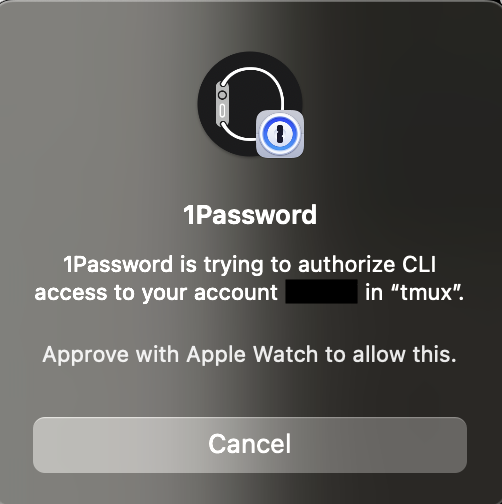
If everything is setup properly, and you have integrated your Mac with Apple watch, this will happen when running vpnstart:
Q&A
Q: Why is your script not optimized? Don’t you need to check if op is installed, or if op is authenticated?
A: This is a bare minimum setup - feel free to extend it in any way!
Q: This setup is not detailed! I ran into problems while using this file! A: further explanation will be done either in another post!